Your Beautiful Resume Is Why You're Not Getting Callbacks
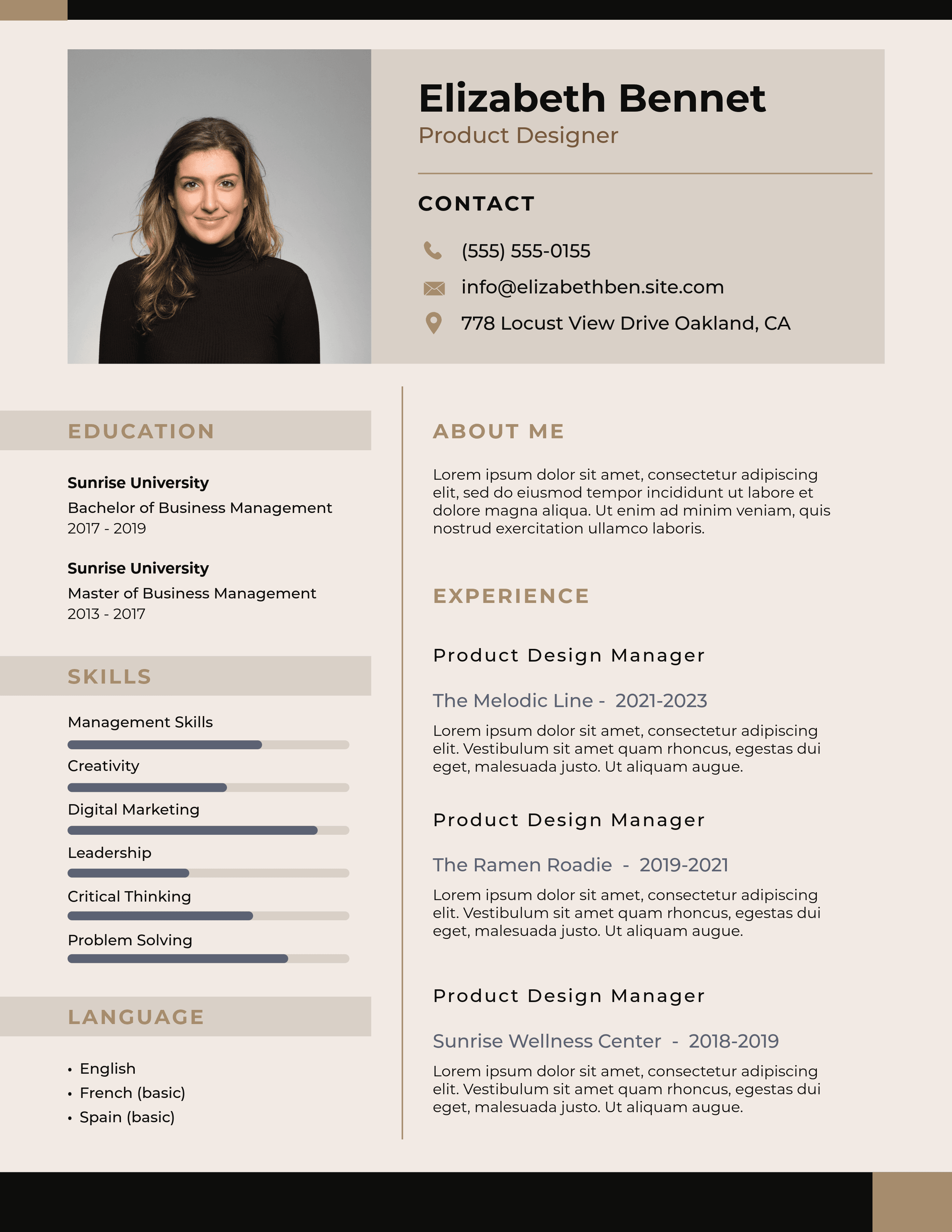
You spent 45 minutes picking the perfect resume template. Custom colors. Clean sidebar. Skill bars that show you're "90% proficient" in Excel. It looks incredible on screen.
And it's the reason you've applied to 60 jobs without a single callback.
Here's what most job seekers don't know: before any human reads your resume, software reads it first. That software is called an Applicant Tracking System, or ATS. And your beautiful template? The ATS can't read it. It sees garbled text, missing sections, and scrambled contact info. So it scores you low, ranks you at the bottom, and a recruiter never opens your file.
This isn't a niche problem. According to Jobscan, 99% of Fortune 500 companies use ATS software to filter resumes before a human ever sees them. Workday, Taleo, Greenhouse, iCIMS, Lever. These systems process millions of applications every day. And the "creative" resume templates flooding Canva, Etsy, and Pinterest? They were designed to impress humans, not machines.
The cruel irony: the more effort you put into making your resume look good, the worse it performs where it matters most.
What ATS Software Actually Sees When You Hit Submit
An ATS doesn't "look" at your resume the way you do. It doesn't see color, layout, or typography. It runs a parser that extracts raw text, then tries to map that text into structured fields: name, email, phone, job title, company, dates, skills.
When you use a single-column, plain-text-friendly format, the parser reads top to bottom, left to right. Everything lands in the right field. Your 8 years of Python experience gets logged correctly. Your most recent job title matches the one you're applying for. Your contact info is intact.
But hand the parser a two-column template like this one, and everything breaks:
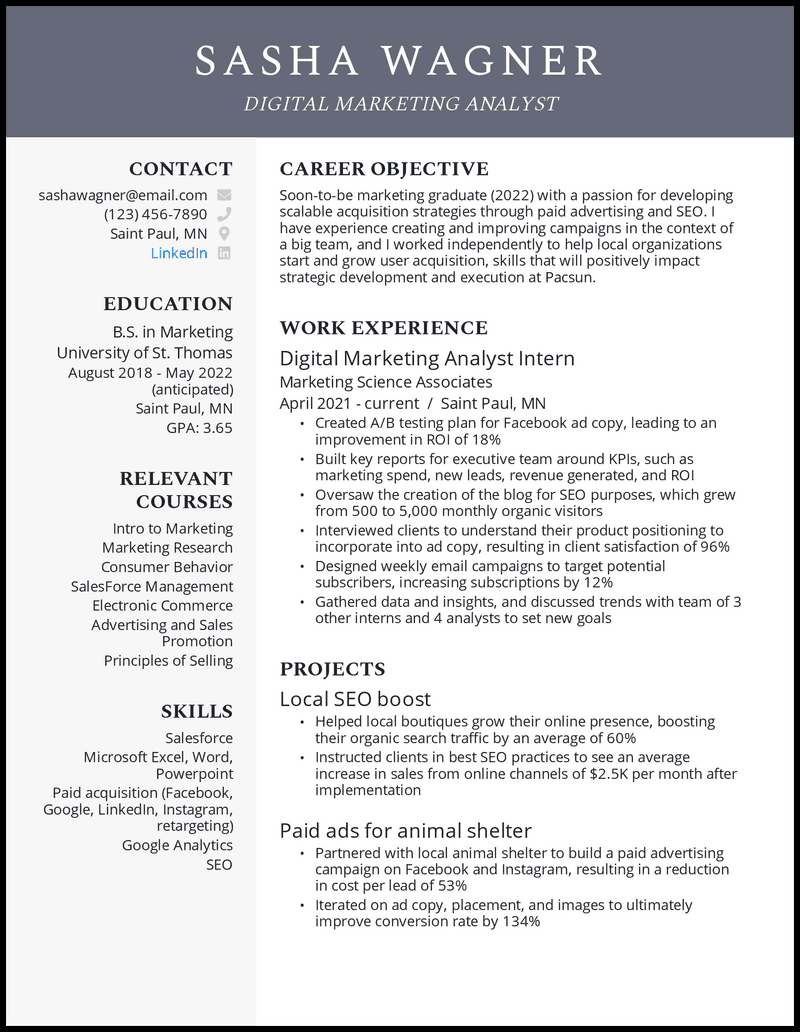
The parser reads left to right across both columns simultaneously. So instead of reading "Contact: sashawagner@email.com" and then "Career Objective: Soon-to-be marketing graduate..." it interleaves the sidebar text with the main column. The result is gibberish. Skills from the left column merge into job descriptions from the right. Dates get attached to the wrong roles. The phone icon renders as a random glyph.
Think of it this way: you're writing a letter, but the mailroom shreds it before the recipient opens the envelope. Doesn't matter how good the letter is.
6 "Creative" Resume Design Choices That Tank Your ATS Score
Not all design sins are equal. Some just cost you a few points. Others make your resume completely unreadable. Here are the six worst offenders, ranked by damage.
1. Two-Column or Sidebar Layouts
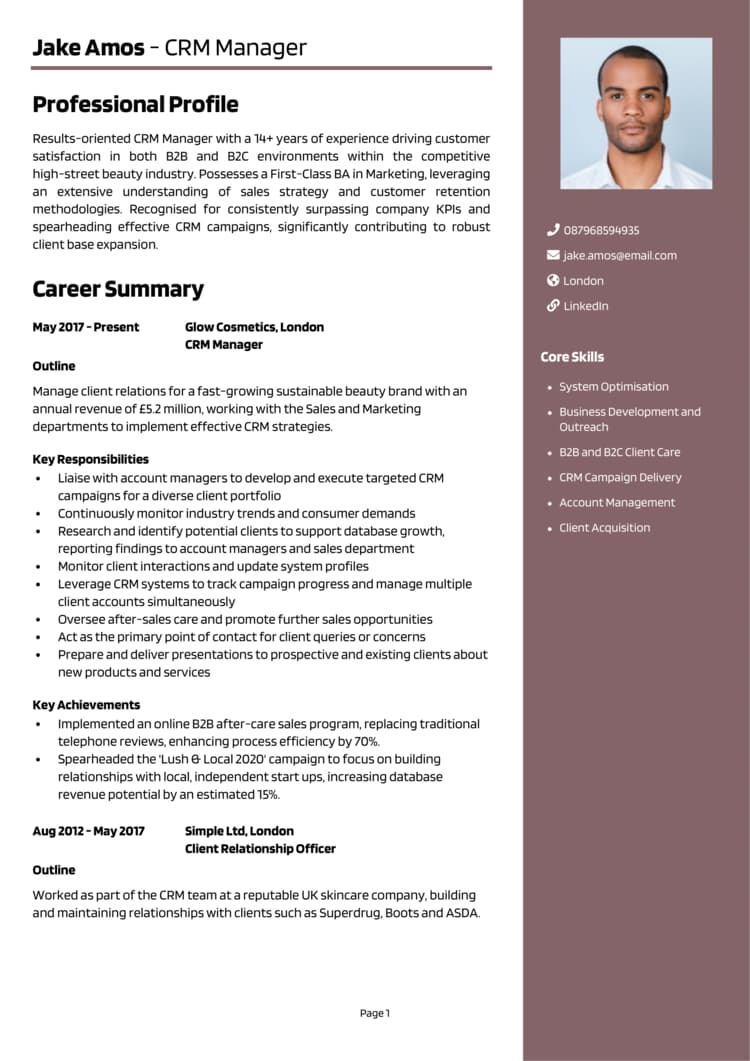
This is the single biggest ATS killer in 2026. Parsers read left-to-right across the full page width. A sidebar creates two parallel streams of text that get interleaved into nonsense. Your skills section ("Python, SQL, Tableau") merges with your job description ("Led quarterly planning...") and the parser stores "Python Led quarterly SQL planning Tableau" as your experience.
2. Icons and Graphics Next to Contact Info
That cute phone icon next to your number? The email envelope? The LinkedIn logo? ATS parsers see glyphs, not icons. Your phone number might get stored as "◆ (555) 123-4567" and the system can't extract it. Some parsers skip the entire line. Your email, phone, or LinkedIn vanishes from your application.
3. Skill Bars, Star Ratings, and Percentage Rings
These are purely visual. The ATS extracts zero information from a colored bar. Worse, they're meaningless to humans too. What does "85% JavaScript" even mean? You either know JavaScript well enough for the role or you don't. Replace them with a plain text list: "JavaScript, TypeScript, React, Node.js." The ATS can actually read that.
4. Photos and Headshots
In the US and UK, photos on resumes are already a red flag for hiring bias concerns. But from a parsing perspective, they're just an image the ATS skips. The problem? Some templates place the photo inside a text box or table cell. When the parser hits that cell, it may skip everything in it, including your name if it's positioned next to the photo.
5. Headers, Footers, and Text Boxes
Many Word and Google Docs templates stuff your name, email, and phone into the document header. Older ATS parsers (including Taleo, which powers a huge chunk of enterprise hiring) ignore headers and footers entirely. Your name literally disappears from the parsed result. Text boxes have the same problem: they exist in a separate layer that parsers often skip.
6. Decorative or Non-Standard Fonts
If the font isn't embedded in the file, the parser maps unknown glyphs to random characters. Your own name can get misspelled in the system. Stick with Arial, Calibri, Georgia, or Times New Roman. Not Playfair Display. Not Montserrat Thin at 9pt.
The 10-Second Test That Reveals If Your Resume Is ATS-Safe
You don't need special software to check this. Open your resume in Word or Google Docs. Select all. Copy. Paste into Notepad (Windows) or TextEdit set to plain text (Mac).
What you see is approximately what the ATS sees.
If the pasted text shows:
- Sections out of order (skills mixed into job descriptions) = your two-column layout is breaking parsing
- Random symbols (squares, diamonds, question marks) = non-standard fonts or icons the parser can't read
- Missing contact info = it's trapped in a header/footer or text box
- Bullets replaced by commas or nothing = non-standard bullet glyphs
- Garbled dates = smart quotes or em dashes confusing the date parser
Here's what matters most to ATS scoring algorithms. The breakdown varies by platform (Workday weighs things differently than Greenhouse), but the general consensus across the industry looks like this:
Look at that red bar. 30% of your ATS score comes from whether the parser can even read your file correctly. A fancy template that fails parsing doesn't just lose you a few points. It wipes out almost a third of your total score before a single keyword is evaluated.
Combined with keywords (40%), that means 70% of your score depends on two things: can the robot read it, and do the right words show up. Design contributes zero.
What a Resume That Actually Passes ATS Looks Like
The resumes that score highest are the ones most candidates would call "boring." Single column. Standard fonts. No images, icons, or colors. That's the point. They're not designed to win a design award. They're designed to get read.
Here's what works:
- Single-column layout. Top to bottom, nothing alongside. This is the #1 formatting change you can make.
- Standard section headings. "Professional Experience," "Skills," "Education." Not "Where I've Made an Impact" or "My Journey." The ATS is coded to recognize standard headings. Get creative and it dumps your content into an uncategorized bucket.
- Plain text contact info in the document body. Not in the header. Not in a text box. Just your name, email, phone, city, and LinkedIn URL on the first few lines.
- Consistent date formatting. "January 2022 - Present" across every role. Not "Jan '22" in one place and "2022-01" in another.
- Standard bullet characters. Use a simple bullet (•) or hyphen (-). Avoid arrows, stars, or checkmarks.
- .docx file format. It's the most reliably parsed format across Workday, Taleo, Greenhouse, and iCIMS. PDF is acceptable if it's text-based, but .docx is the safer default.
Now compare that with a template like this:
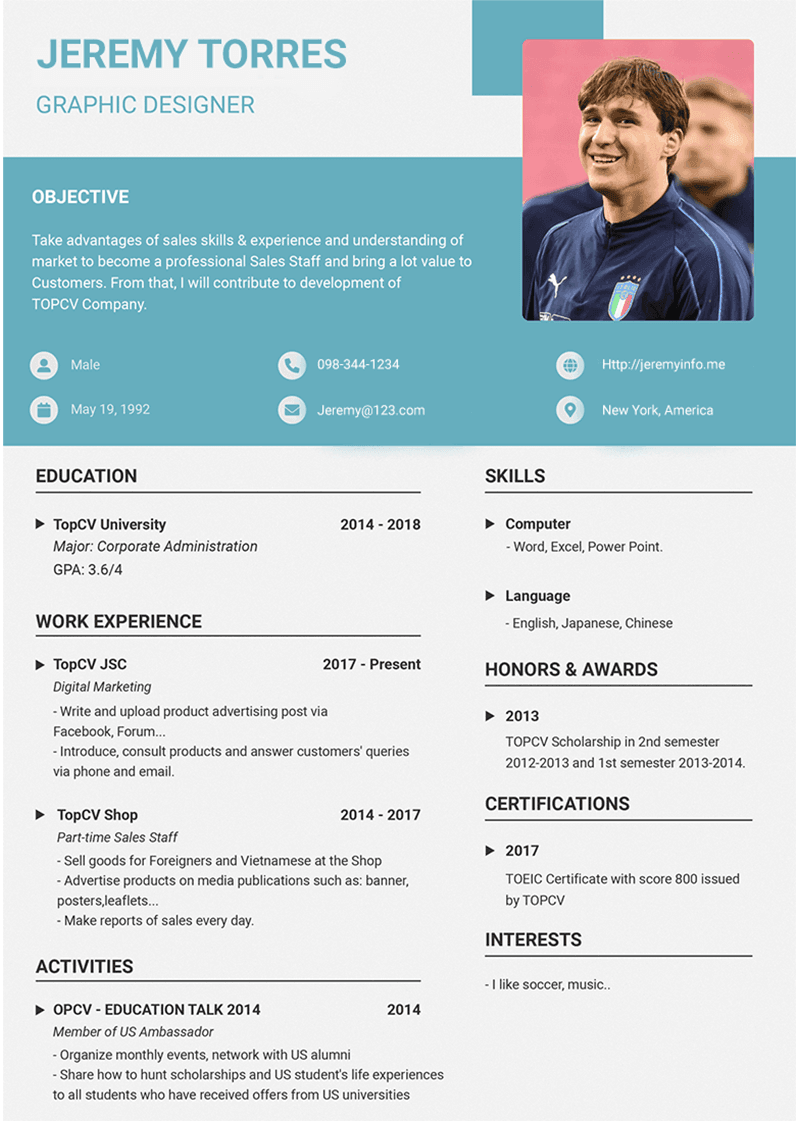
Count the problems: photo in the top right (parser skips it and possibly adjacent text). Two-column layout (content gets interleaved). Colored background blocks (no parsing value, may obscure text extraction). Icons next to contact info (garbled glyphs). "Objective" heading (outdated, should be "Summary"). "Interests" section (wastes space, no ATS value).
Every single design choice in that template exists to impress a human viewer. Not one of them helps the machine that decides whether a human will ever see it.
The ATS Score Sweet Spot (and Why 100% Is a Red Flag)
If you're using a tool like Jobscan to check your resume against a job description, you'll get a match percentage. Here's what the ranges actually mean:
- Below 60%: Almost certainly filtered out. No human will see it.
- 60-75%: Borderline. Might pass for low-competition roles.
- 75-85%: The sweet spot. High pass rate without looking stuffed.
- 85-90%: Strong, but watch for over-optimization.
- Above 90%: Actually a red flag. Some modern parsers flag this as keyword-stuffed or AI-generated.
Aim for 80%. That's the number Jobscan recommends, and it correlates with the highest interview callback rates in their published data.
But here's the thing: you can't hit 80% if the parser can't even read your resume. A fancy template that garbles your text doesn't just lose formatting points. It also destroys your keyword match because the parser can't find keywords in scrambled text. The formatting problem cascades into a keyword problem, and your effective score drops to near zero.
Stop Designing Your Resume. Start Engineering It.
The resume template industry has sold job seekers a lie: that standing out visually is how you get noticed. In reality, standing out visually is how you get filtered out.
The fix is simple. Use a clean, single-column format. Standard fonts. Standard headings. No icons, no photos, no sidebars. Tailor the content for each job. Hit 80% keyword match. Pass the plain-text test.
Or let software handle all of that for you.
Scaling Jobs AI's resume tailor takes your profile, compares it against the specific job description, and generates a clean, ATS-optimized resume with the right keywords in the right places. No formatting roulette. No guessing which template will parse. Every resume comes out single-column, correctly structured, and built to score above 80% on the systems that actually decide who gets an interview.
Frequently Asked Questions
Can a fancy resume template ever work?
Only if you're handing it directly to a human and bypassing the ATS entirely. If you're emailing a hiring manager directly, or handing a printed copy to someone at a career fair, a polished design can help. But for online applications (which is 95%+ of job submissions), the ATS reads it first. And fancy templates fail ATS parsing consistently.
What ATS score should I aim for?
Target 75-85% on tools like Jobscan. 80% is the sweet spot: high enough to pass filters reliably, low enough to avoid triggering keyword-stuffing detectors. Going above 90% can actually hurt you, as some systems flag over-optimized resumes.
Should I submit my resume as PDF or DOCX?
DOCX is the safest choice in 2026. It parses most reliably across Workday, Taleo, Greenhouse, and iCIMS. PDF is fine if the job posting accepts it and your PDF has selectable text (not a scanned image). When in doubt, go with .docx.